
Job Timeline
TL;DR
Tag a job with the record it works on, give it a name, and the record page shows every job that ran, runs or will run for that record. Failed steps can be requeued from there, in the original order, with their dependencies rebuilt.
Async.queueable(new ReserveStockJob(lines))
    .name('Reserve stock')
    .chainName('Order fulfilment pipeline')
    .linkRecord(order)
    .linkRecords(lines)
    .chain(new CreateInvoiceJob(order)).name('Create invoice').linkRecord(order)
    .chain(new CommissionSplitJob(order)).name('Commission split').linkRecord(order).retry(2)
    .chain(new AccountRollupJob(order.AccountId))
        .name('Recalculate account rollups')
        .linkRecord(order)
        .dependsOn(Async.afterPrevious().succeeded())
    .enqueue();
Place the Async Jobs component on the Order record page in App Builder and assign AsyncResultAccess to whoever should see it. That is the whole setup.
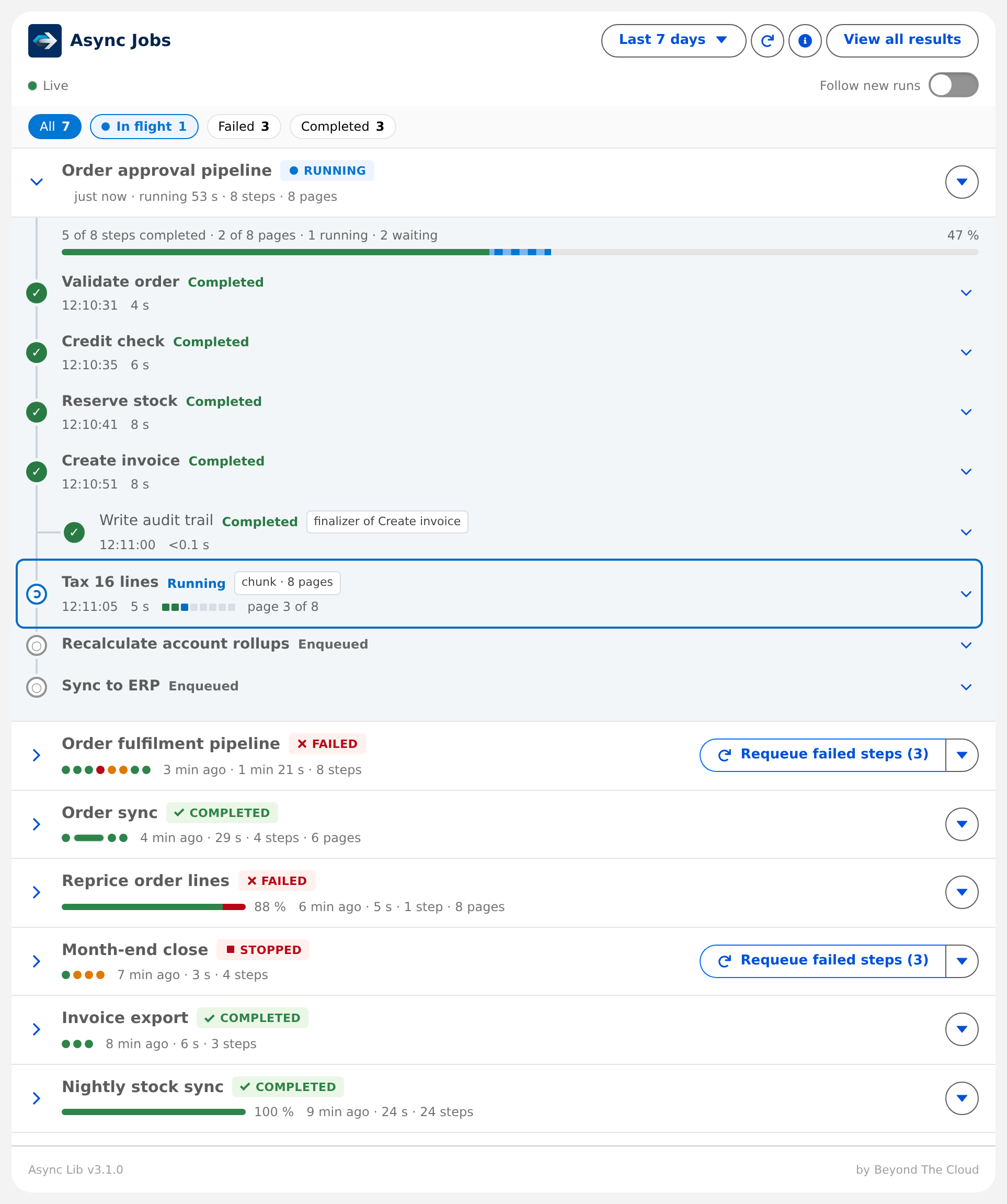
Linking a job to a record
linkRecord(...) and linkRecords(...) on the builder accept what you already have in hand: an SObject, an Id, a List<SObject>, a List<Id> or a Set<Id>. Duplicates collapse, order is kept, and a requeued job reads its links back from the stored rows. On a chunk run the builder links go on the first page; a page links its own records from inside work().
A job can also point at a record that lives somewhere else: an ERP customer, a payment, a ticket. linkExternalRecord('NetSuite', 'Customer', '4711') stores the key with the source system and object name you pass, so that system can later ask what ran for its record:
SELECT AsyncResult__r.Name, AsyncResult__r.Status__c, AsyncResult__r.JobName__c
FROM AsyncResultLink__c
WHERE Source__c = 'NetSuite' AND Key__c = '4711'
Only the key is required. source and objectName are stored exactly as given and stay blank when you pass nothing; the framework never guesses that a key is a Salesforce Id. Source__c is an open picklist with Salesforce as its one packaged value, add your own systems in Setup if you want them on reports. linkExternalRecords(List<Async.RecordLink>) takes many at once.
A job often discovers related records while it runs. Link them from inside work():
public override void work() {
    Account parent = [SELECT Id FROM Account WHERE Id = :order.AccountId];
    Async.linkRecord(parent);
}Async.linkRecord(...), linkRecords(...) and linkExternalRecord(...) only buffer links on the running job. Nothing is written until the job settles, so a job that calls out afterwards is not affected. Outside a running job the call throws; before the job runs, use the builder.
Linking forces a result row. A job linked to a record always writes its AsyncResult__c row, whatever CreateResult__c says. You linked it so it shows up on the record; a row is how it shows up. The links themselves are rows of AsyncResultLink__c, one per result and record: Key__c (the Id or the external key, indexed so a record page or an integration can select by it), Source__c (Salesforce for linkRecord(s), as given for linkExternalRecord(s)) and ObjectName__c (the API name for a Salesforce Id, as given otherwise). A record linked twice, once from the builder and again from work(), is still one row: UniqueKey__c hashes source and key per result, so the database rejects the second and the job carries nothing extra through the chain. Each row counts 2 KB of data storage, like any record, and goes with its result when the cleanup batch deletes it.
MaxRecordLinks__c on QueueableJobSetting__mdt caps the links stored per job. Blank means 5000, which is also the ceiling. Links beyond the limit are dropped with a warning in RetryHistory__c, and the warning names the limit, the job and how many it was given.
Names
name('Reserve stock') is the display name of one job, stored in JobName__c. Without it the class name is shown. chainName('Order fulfilment pipeline') names the whole chain: set it on any job, the last one set wins, and every result of the chain carries it in ChainName__c. Both names travel with the payload, so a requeued run keeps them.
Lifecycle: seeing a chain in flight
By default a result row is written when a job settles. Turn TrackJobProgress__c to Yes on QueueableJobSetting__mdt and the row is written when the job is enqueued, with Status__c = ENQUEUED, and updated in place when it settles. A chain of seven jobs then shows seven rows the moment enqueue() returns: the first with its SalesforceJobId__c, the rest waiting.
| Column | Set when |
|---|---|
ENQUEUED | the job is handed to the chain; SalesforceJobId__c fills in when the platform takes it |
StartedAt__c | work() started on the final attempt |
FinishedAt__c | the job settled, so FinishedAt__c - StartedAt__c is the duration |
NextAttemptAt__c | when the next run is due: a retry, or a delayed job already enqueued; cleared when it settles |
RetryAttempts__c | updated after each failed attempt, so a row reads "attempt 2 of 3" while retrying |
Yes implies a row for every outcome of that job, the same cost as CreateResult__c. Blank falls back to All; No on a job record overrides Yes on All, so a noisy job can opt out.
Nothing is written inside work(). The ENQUEUED rows are inserted right before System.enqueueJob, which already blocks a later callout in the same transaction, and the terminal update runs in the finalizer. A job that calls out is not affected either way.
"Running" is not a stored status. The record page reads AsyncApexJob.Status for every ENQUEUED row that has a job id and shows Queued, Running or Aborted from that. A job aborted with System.abortJob keeps its ENQUEUED row until AsyncResultCleanupBatch removes it. A job whose platform status says Completed or Failed while its row is still ENQUEUED shows as Finishing: the finalizer that writes the row runs in its own transaction, seconds later.
A chain's badge follows its lifecycle, not the mix of its steps: QUEUED until the first step starts, RUNNING from then until every step has settled and every page of a chunk run is there, then COMPLETED, FAILED or STOPPED. The mark in the badge tells what the chain is doing now, a pulsing dot while a step executes, a hollow dot while the platform holds the next one, a refresh arrow while a retry waits, and a red count next to the badge is the number of steps failed so far. A chunk run that still misses pages but has been quiet for ten minutes counts as finished.
The record page component
Async Jobs targets any record page, in Lightning and in Aura-based Experience sites. One card per chain, newest first by the time the chain was created. A chain never moves when it finishes, so the row you are watching stays where it is, and only a new run shifts the list. The In flight chip turns blue with a pulsing dot while something runs: click it to see only those chains. A chain that finishes while the filter is on stays visible until you leave the filter, so the chip count can be lower than the rows shown. The card opens a chain by itself only on the first page of All, only when nothing is open, and only the first chain that is running; it never does so under a filter or on a later page. What you open or close stays that way across filters and pages, and an open chain stays open after it settles. A chain that starts while another is open only gets a pulsing New badge and a note in the live line, unless Follow new runs is on (an App Builder attribute and a switch next to the live line): then the newcomer opens and the others collapse, for a card left open on a screen. Every other chain collapses to two lines, the name and badge, then a line with the relative start time and duration and one dot per step, a chunk run as a small strip worth three dots. When those do not fit in 16 dots, or the chain is only chunk runs, a progress bar replaces them, so no step is ever left out of the picture. Click the header row or the chevron to toggle; the header you clicked stays where it is, and collapsing also folds any run of completed steps you had opened. Each step shows its glyph, name, status, up to two facts (priority, finalizer of, added by, chunk pages, dependency, requeued), timing and linked records as chips that open the record in a new tab; the record whose page shows the card gets no chip, every step here is linked to it. A blue outline marks the step the platform holds right now: the one running, or, before anything runs, the one waiting in its queue or for its retry. Click anywhere on a step for its details: class, custom and Salesforce job ids, position, attempts, timings, dependencies, the exception, the retry history and a link to the result record. A requeued step links to its replay: in place when the replay is loaded, otherwise to its result record.
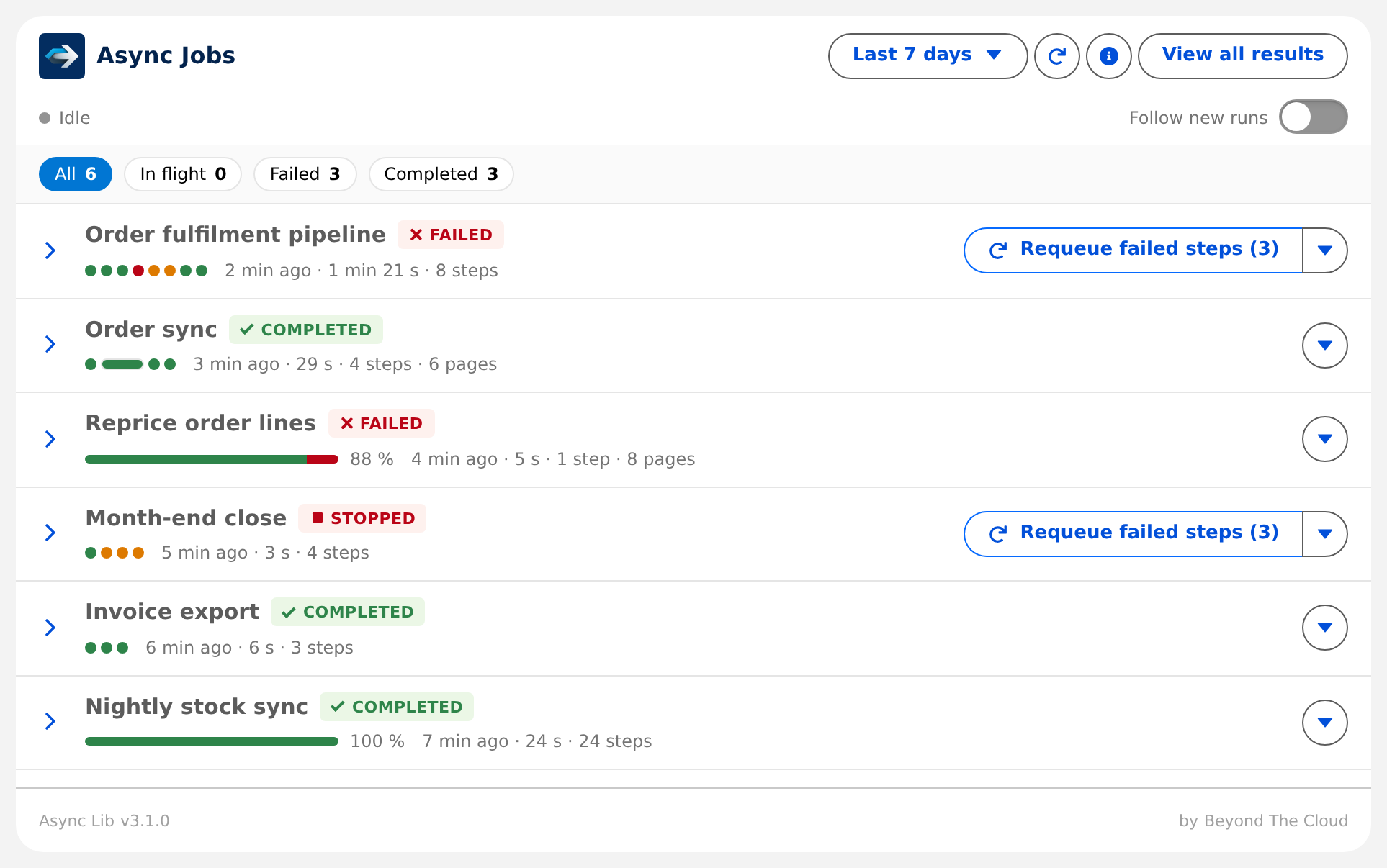
A step whose Salesforce job finished while its row is still ENQUEUED shows as Finishing: the finalizer that writes the result runs in its own transaction, often seconds later.
The toolbar has a range menu (24 hours, 7 days, 30 days, all time), refresh, the legend (a panel over the list, so the card keeps its height; Escape or a click outside closes it) and View all results, which opens the By chain list view. The chips count every chain in the range, not just the page, and filter the list. Chains come in blocks of 50 so the footer pager answers in memory. The list has a fixed height and pages hold as many collapsed chains as fit in it, so a page never scrolls until you open a chain. The refresh button reloads in place.
App Builder attributes:
| Attribute | Default | Effect |
|---|---|---|
| Card title | Async Jobs | |
| Default range in days | 7 | the range selected when the card opens; blank means 7 |
| Sequences per page | 0 | chains per page; 0 fits as many collapsed chains as the height allows |
| Max height in pixels | 600 | the fixed height of the list; 0 lets the card grow |
| Turn off live refresh | off | by default the card polls while a chain is in flight |
| Follow new runs | off | a chain that enters in flight opens by itself and the others collapse |
Live refresh is polling, not Platform Events: every 3 seconds while a job runs or finishes, every 10 while the chain is queued, and when everything in flight is a scheduled retry or a delayed job, not before the earliest is due (10 seconds to 5 minutes). The live line says Live or Idle, with the cadence in its tooltip, and spells out only what would otherwise look like silence: the clock time of the next check during a retry wait, a paused tab, a stop after failed checks, a stale card. It pauses while the tab is hidden and checks the moment the tab is back, keeps going through a failed check and stops after three in a row or after 30 minutes. After a requeue it keeps watching for two minutes even when nothing looks in flight, because a replay without progress tracking has no rows until it settles. An idle card that has not checked for ten minutes turns the refresh button blue and says so in the live line. A Platform Event subscription per open tab would spend the org's delivery allocation, which is shared with Change Data Capture and every integration, and a subscription cannot be filtered to one record. A new step that appears while the card is open slides in with a New badge; a step whose status changed flashes once.
An open chain sits on a light panel with a line through its steps, so the next chain is easy to tell apart. The steps follow the order the chain runs them, and a finalizer branches off its parent. A job added while you watch, say one with a high priority, slides in at the place it will run with a New badge. Open the card later and the same job just sits in that place, with its added by tag. A tag that names another job (after Commission split succeeded, added by, finalizer of) highlights that job's row on hover or keyboard focus. A row shows two tags and keeps the rest behind a +N with their text on hover.
While a chunk run is alive the chain header counts its pages. Once it has ended in a chain with other steps, the run counts as one step and the line under the name gives 6 steps · 16 pages. A chunk row with failed pages lists each page with its error and a link to its result, pages sharing one error grouped together, and its other link opens the first page.
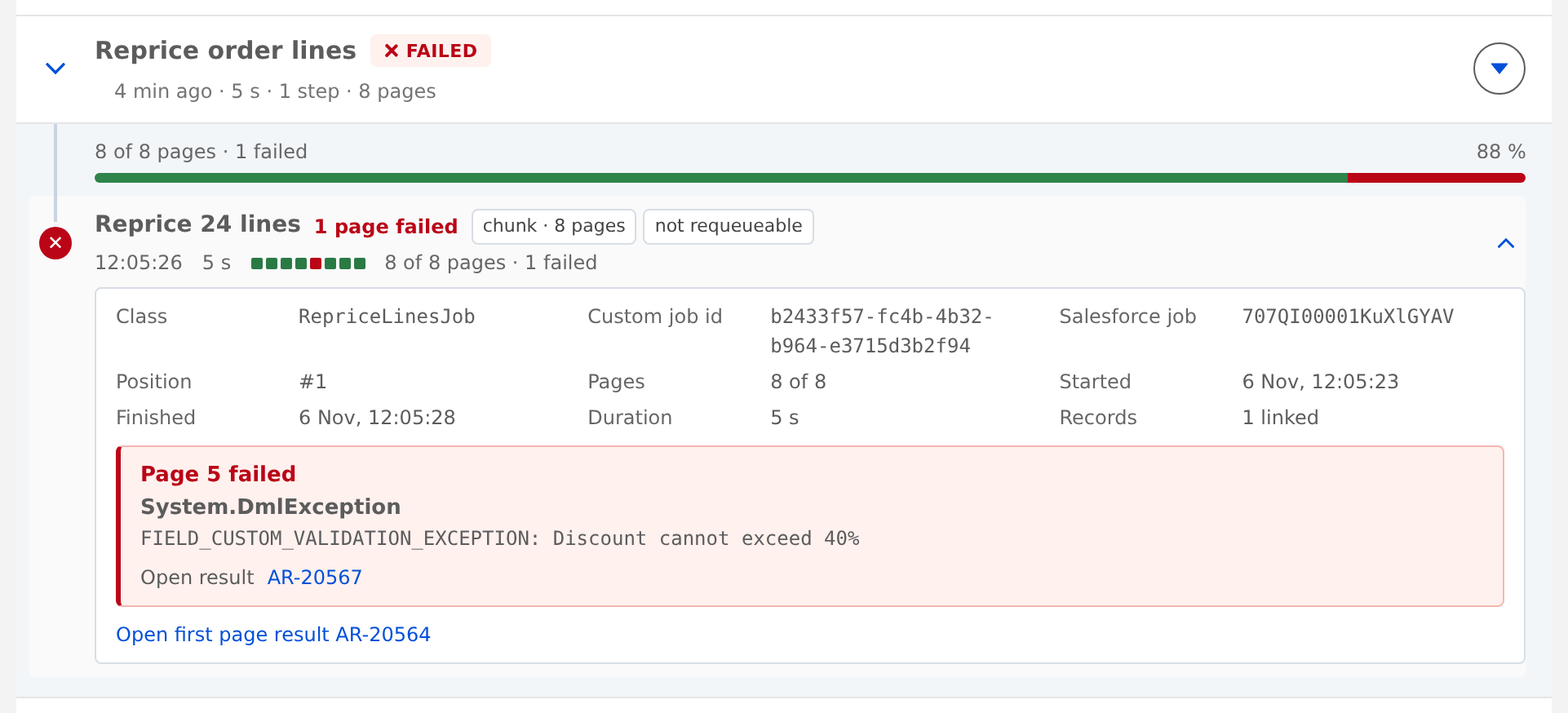
The card adapts to its own width, not the screen's, so it works in a narrow sidebar column. Below 640 px the buttons stay on the first row of each chain: requeue shrinks to an icon with the count, the range to 7 days and View all results to an icon. Very narrow cards hide the footer's brand text before the pager.
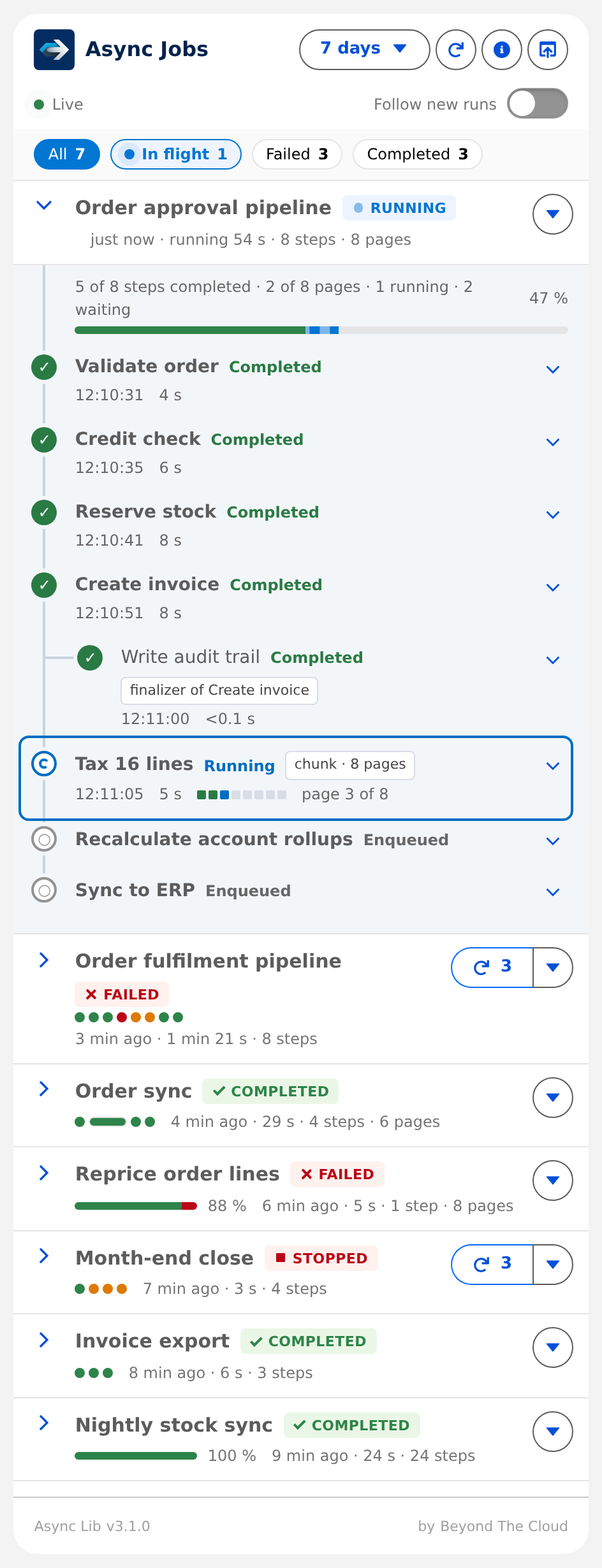
The card holds up to 50 chains in the browser, so pages inside that block change without a server call. With up to 50 chains on the record a filter applies at once to what is loaded, then a quiet refresh updates the view the way a live update does. If that refresh fails, the list stays and the live line says so. Beyond 50 chains the browser cannot filter alone: the rows stay until the answer arrives, and a thin blue line under the filters shows when the wait passes 300 ms. Background refreshes never show it.
What the card refuses to render without a way out:
| Cap | Beyond it |
|---|---|
| 20 steps on an expanded card | the first 3, the last 2 and every step that is not completed stay; each run of completed steps folds into one line that opens on click |
| 200 steps fully expanded | a note points to the first result record |
| 60 chunk pages as squares | a bar with page counts |
| 10 failed pages listed on a chunk row | a count of the rest |
| 3 linked records as chips, the page record excluded | a +N chip, 20 when opened; a chunk row shows the union of its pages; a record in another system is a grey chip with object and key, no link |
| 300 characters of exception | a more link |
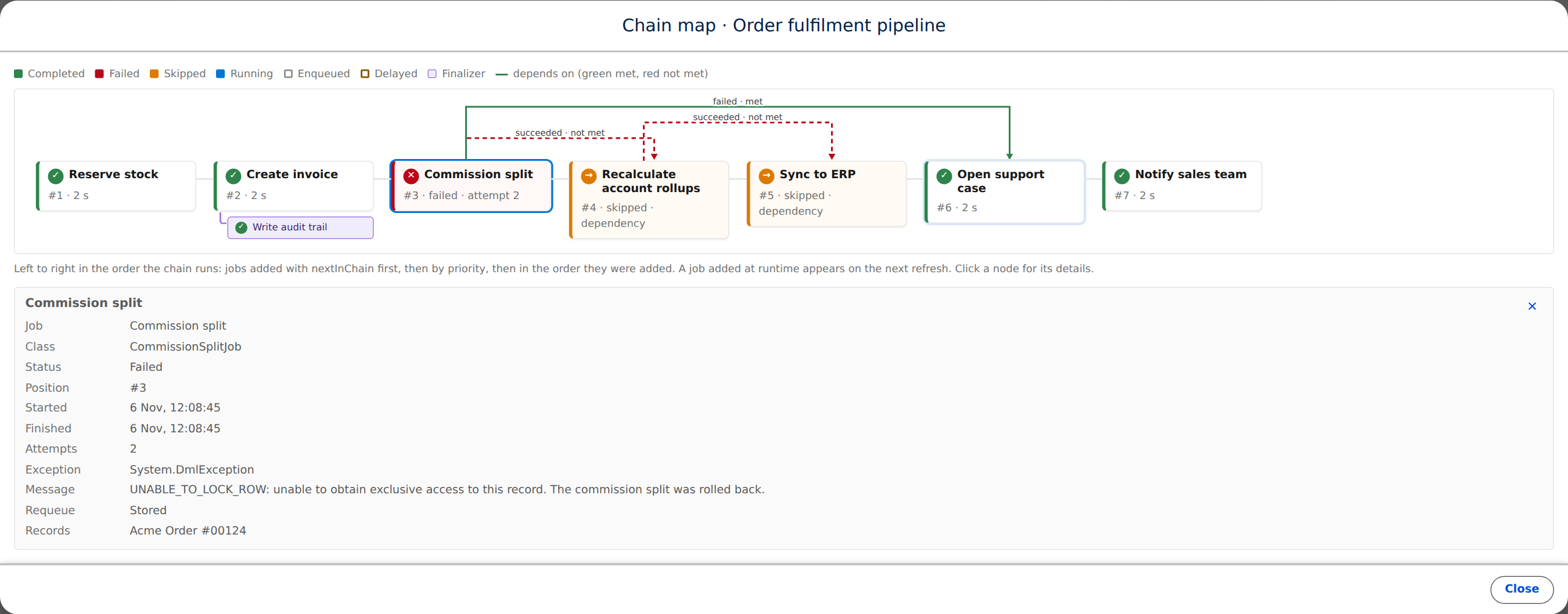
| 40 nodes on the chain map | runs of completed nodes collapse into one that opens on click |
The viewer needs read on AsyncResult__c and AsyncResultLink__c plus access to the controller class. The AsyncResultAccess permission set grants all of it. Without it the card says so by name.
Requeue from the timeline
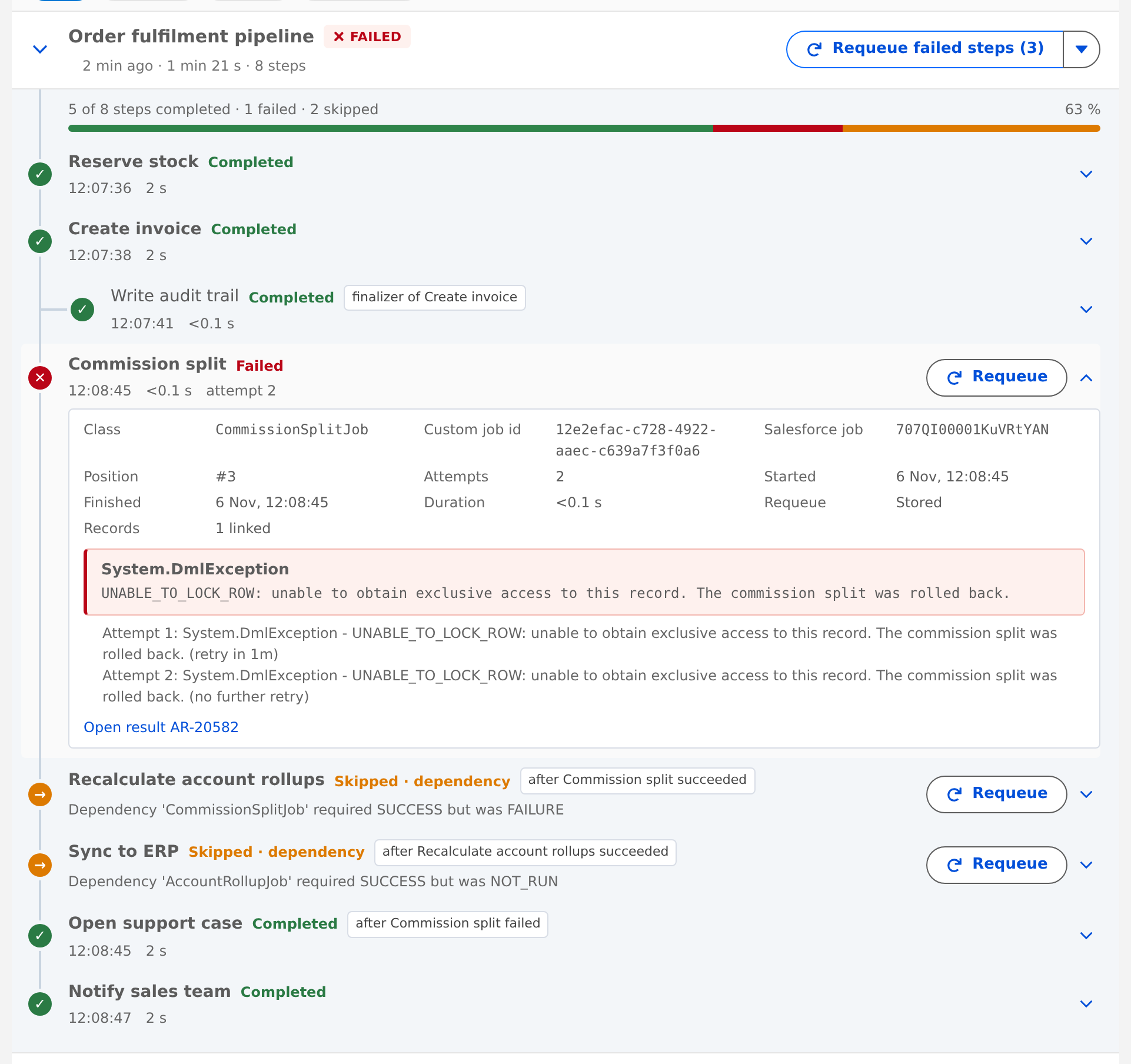
The requeue actions show only for a viewer holding the AsyncRequeue custom permission, shipped in the AsyncRequeueAccess permission set. Async.requeue in Apex stays ungated like every other Async call.
Requeue failed steps appears once the chain has settled. It asks for confirmation, then collects every FAILED and skipped row of the chain that has a stored payload and replays them as one new chain, in the original order. A step whose payload was not stored is listed in the outcome, never silently skipped. The new chain appears at the top of the card with a Replay of badge, and the source rows switch to Requeued.
Dependencies travel with the row in Dependencies__c and are rebuilt on replay:
| The dependency points at | Then |
|---|---|
| a row in the same requeue call | the replayed dependent depends on the replayed target |
| a row outside the call whose outcome satisfied it | the dependency is dropped and reported in droppedDependencyByResultId |
| a row outside the call whose outcome did not satisfy it | the dependent is skipped with a reason; requeue both, or enqueue it fresh |
| a row that no longer exists | the dependent is skipped with a reason |
The chain map
The ▾ menu on a card opens the chain as a pipeline: one node per step in the order the framework will run them, with the name in full, position, duration or state, priority and who inserted it. Dependencies are drawn as elbow connectors above the nodes, green when met, red and dashed when not, grey while pending, each labelled with the rule. Finalizers hang under their parent, a chunk run shows its page strip, runtime inserts are dashed. The map opens on the first failed node, or the one running now; click any node for its details. The map shows the order as sorted now; a job chained later at runtime appears on the next refresh.
Running a job next in the chain
Inside a running job, nextInChain() places a new job right after the current one, before everything already waiting, whatever priority the waiting jobs carry:
public class CreateInvoiceJob extends QueueableJob {
    public override void work() {
        Invoice__c invoice = createInvoice();
        if (invoice.NeedsTaxCalculation__c) {
            Async.queueable(new CalculateTaxJob(invoice))
                .name('Calculate tax')
                .linkRecord(invoice)
                .nextInChain()
                .enqueue();
        }
    }
}
Finalizers of the current job still run first. Two nextInChain() calls from one job run in call order, and a job inserted by an inserted job runs before its siblings. Inside a chunk page the inserted job runs after that page and before the next one. nextInChain() cannot be combined with priority(), and outside a running job it throws: there, chain() and enqueue() already run jobs in order. The row records who added it in AddedByCustomJobId__c, the same as for a job a running job adds with chain() or enqueue().
Delayed jobs
A job with delay(n) is enqueued when its turn comes, so its delay starts when the job before it finishes. The card only shows a clock time it can actually know:
| State | Chain badge | Chain line | Job row |
|---|---|---|---|
| Nothing has started, the first job is delayed | DELAYED | starts at 10:05 | Delayed, until 10:05 |
| Running, a later job has a delay | RUNNING | running 2 min | Enqueued, delay 10 min |
| Running, the next job is enqueued and waiting | RUNNING | DELAYED | next step at 10:18 | Delayed, until 10:18 |
| Same, and a job has already failed | RUNNING | ✕ 1 | DELAYED | next step at 10:18 | Delayed, until 10:18 |
The time is the earliest the job can start. If it passes and the job has not started, the org is busy: the row goes back to Queued and the chain drops DELAYED. delayBetweenChunks works the same way between pages. A retry keeps its own Retrying state. A job scheduled with Async.schedulable is not delayed: it has no row until the schedule fires.
Fields added to AsyncResult__c
| Field | Holds |
|---|---|
JobName__c, ChainName__c | the names |
ChainSequence__c | position inside the chain, in the order it runs, and the requeue order. It can change only while the job waits |
Priority__c | the priority, when set |
ParentCustomJobId__c | for a finalizer, the job it was attached to |
AddedByCustomJobId__c | for a job added while another job ran, the job that added it |
ChunkRunId__c, ChunkPage__c, ChunkPages__c | for a chunk page, its run and position |
DelayMinutes__c | the delay set on the job; a backoff between retries does not count |
Dependencies__c | the dependsOn rules as JSON |
StartedAt__c, FinishedAt__c, NextAttemptAt__c | timing |
Every field is on the page layout, the record page and in AsyncResultAccess. The object has a tab and four list views: Failed (last 7 days), In flight, Replayable and By chain.
On a packaged install
The component, the permission sets and the custom permission ship in the package. Place Async Jobs from App Builder, assign btcdev__AsyncResultAccess to viewers and btcdev__AsyncRequeueAccess to operators. Requeue from the timeline needs the same AsyncJobSerializer registration as Async.requeue(), see Requeue.